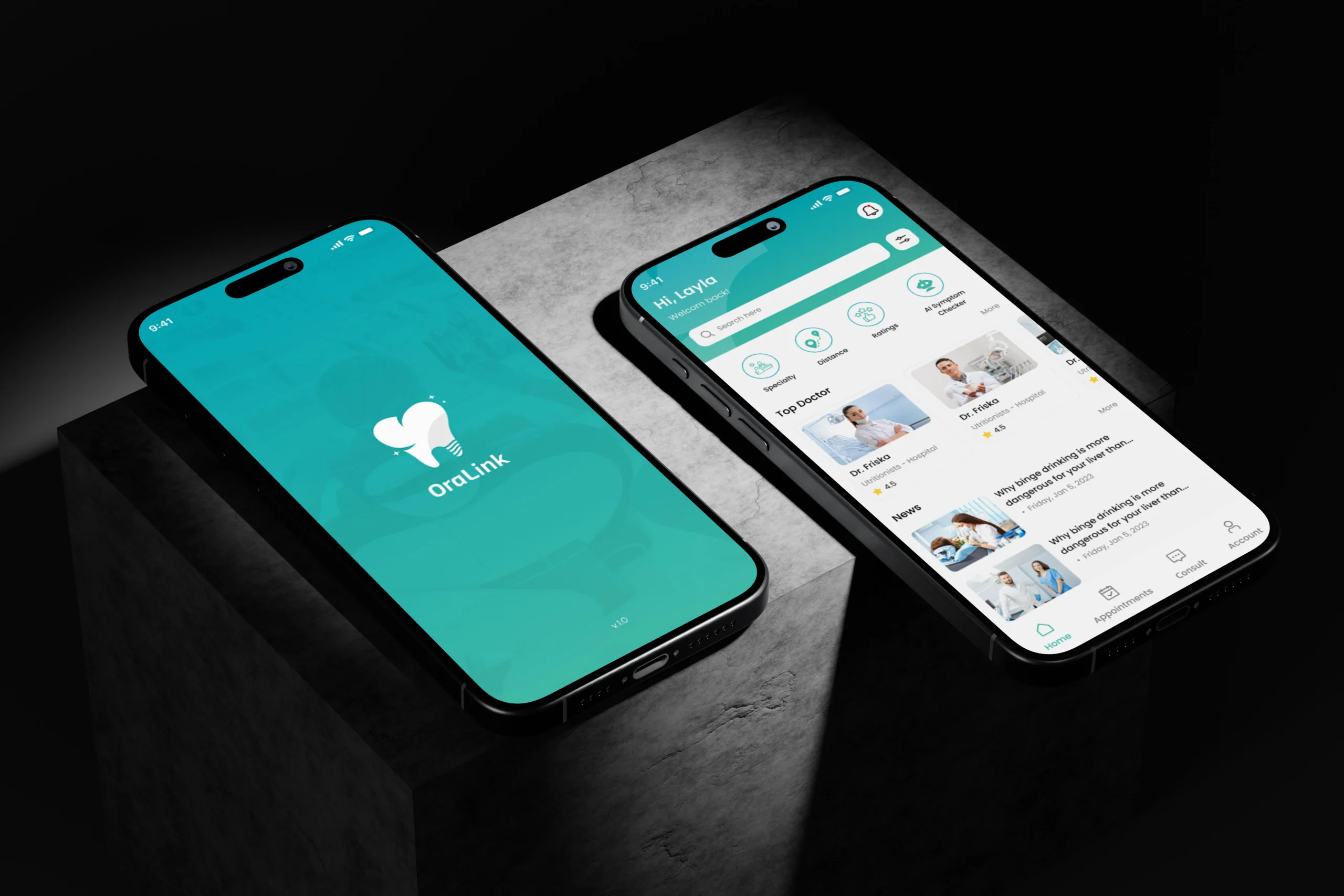
Nintendo’s Next Big Move? The Buzz Around Its New Music App
Nintendo has spent decades building some of gaming’s most recognizable soundscapes. The cheerful bounce of a Mario theme, the quiet ambience of Animal Crossing, and the sweeping melodies of The Legend of Zelda often remain memorable long after players put down the controller. However, accessing that music outside a game has not always been simple. That gap explains much of the interest surrounding the Nintendo music app, a dedicated streaming service built around soundtracks from the company’s game catalog. Nintendo Music is not technically brand-new. It launched on October 31, 2024, for Android and iOS. Nevertheless, major improvements introduced since then—including browser access, tablet support, personalized mixes, and in-car playback have renewed attention around the service. As a result, the app now feels less like a small membership bonus and more like a broader entertainment platform. What Is the Nintendo Music App? Nintendo Music is an official game soundtrack streaming service for Nintendo Switch Online members. It gives listeners access to music from franchises such as Super Mario, Animal Crossing, Splatoon, Metroid, Pokémon, and The Legend of Zelda. Users can browse individual game albums, explore themed collections, make playlists, save favorites, and download tracks on compatible mobile devices for offline listening. Meanwhile, the service pairs many songs with artwork or screenshots from the games in which they appeared. In simple terms, it works like a focused alternative to a general music platform. Instead of offering millions of songs from unrelated artists and genres, it concentrates on Nintendo’s own video game music library. Quick Facts About Nintendo Music Question Answer When did it launch? October 31, 2024 Who can use it? Nintendo Switch Online members with a Nintendo Account Is a Switch console required? No Where is it available? Compatible phones, tablets, web browsers, Apple CarPlay, and Android Auto Can music be downloaded? Yes, through the compatible mobile app Does it cost extra? It is included with an eligible Nintendo Switch Online membership Can families share access? A family membership can include up to eight members Nintendo also offers access through its seven-day Nintendo Switch Online trial in eligible regions. However, availability still varies by country. Why Is Nintendo Music Getting Attention Again? The original release generated curiosity because Nintendo had finally created a convenient home for much of its game music. Even so, the early version had noticeable limits. Critics pointed to a modest launch catalog, missing desktop access, inconsistent track-extension support, and limited recognition of the people who composed the music. Since then, Nintendo has addressed several practical complaints. The service now supports listening through a computer browser, compatible tablets, Apple CarPlay, and Android Auto. Therefore, users are no longer restricted to playing music through a phone. Nintendo’s official page also says the current library includes more than 250 hours of music across over 130 game titles. That broader availability matters. A soundtrack platform becomes much more useful when people can play it while working at a computer, studying on a tablet, commuting in a car, or relaxing away from a console. What Features Make the App Different? Nintendo Music borrows familiar ideas from mainstream streaming platforms. However, several features are designed specifically around video game listening. Extended Playback Many game tracks were written to loop naturally because players might remain in the same area for an extended period. Nintendo Music uses that structure by allowing selected tracks to play continuously for 5, 10, 15, 30, or 60 minutes. Consequently, a short background theme can become a longer study, work, or relaxation playlist without obvious interruptions. The option is not available for every track, but it remains one of the app’s most distinctive features. Spoiler Protection Music titles can reveal more than expected. A track named after a final boss, hidden location, or late-game character could spoil an important moment. To prevent that, listeners can hide music associated with games they have not completed. This is a small feature, yet it shows that Nintendo understands soundtrack discovery differently from ordinary music browsing. Game-Based Recommendations The service can recommend music based on a user’s Nintendo Switch play history. Therefore, someone who frequently plays Splatoon, Mario Kart, or Animal Crossing may see collections connected to those experiences. In addition, the My Mix feature creates a personalized playlist using listening and play-history signals. However, Nintendo notes that My Mix is currently unavailable through the web-browser version. Curated Playlists Listeners can explore collections built around characters, moods, game situations, or franchises. For instance, a playlist may focus on battle music, relaxing themes, or songs connected to a specific character. This approach makes the catalog easier to explore, especially for people who recognize a melody but cannot remember the exact game or track name. Do You Need a Nintendo Switch to Use It? Surprisingly, no. A user needs an eligible Nintendo Switch Online membership and a Nintendo Account, but Nintendo states that owning a Switch system is not required. Therefore, a longtime fan could subscribe primarily to access the music library, even without currently owning Nintendo hardware. Still, the service makes the most sense as part of the broader membership. Nintendo Music is positioned alongside online multiplayer, classic games, cloud-related features, and other subscriber benefits rather than sold as a separate music subscription. Is Nintendo Music a Spotify Competitor? Only in a limited sense. Each platform supports on-demand playback, custom playlists, personalized suggestions, saved tracks, and downloads for listening without an internet connection. Nevertheless, their goals are different. Spotify, Apple Music, and similar platforms aim to provide enormous multi-label catalogs. Nintendo Music takes a narrower approach, offering a dedicated soundtrack library drawn entirely from Nintendo’s own game franchises. Therefore, Nintendo is not trying to replace a listener’s main music service. Instead, it is creating a controlled destination where fans can explore game music in a format connected closely to Nintendo’s characters, visual identity, membership system, and software history. Its gaming-focused purpose is reflected in features that hide potential story spoilers, suggest music from titles a listener has played, and lengthen selected tracks for
Build NFT-Based “Play-to-Earn” Games Using Unreal Engine
Building nft-based play-to-earn games with Unreal Engine requires more than connecting a wallet to a game menu. The gameplay, player accounts, reward rules, smart contracts, asset metadata, and blockchain transactions must work together without slowing the experience or exposing valuable systems to abuse. Build the gameplay foundation first, then introduce blockchain-based ownership only in areas where it meaningfully improves the player experience. In other words, players should enjoy the combat, exploration, crafting, racing, or strategy loop even when no token reward is involved. Once that foundation works, NFTs can represent selected assets, prizes, access rights, or tradeable collectibles. What Is an NFT-Based Play-to-Earn Game? An NFT-based play-to-earn game allows users to obtain blockchain-backed assets through gameplay. Depending on the design, those assets may include characters, cosmetic skins, land, equipment, tournament prizes, membership passes, or crafting resources. However, owning an NFT does not guarantee that the item will retain financial value. Demand can decrease, token prices can change, and the game economy may need to be adjusted after launch. Therefore, developers should clearly explain: Modern Web3 games often use a play-and-own approach rather than focusing entirely on earnings. Players can focus on enjoying the game first, while blockchain-based ownership remains an optional feature rather than the main attraction. Why Choose Unreal Engine for a Web3 Game? Unreal Engine is well suited to projects that need detailed 3D environments, real-time combat, advanced lighting, character animation, physics, multiplayer replication, or cinematic presentation. Its Blueprint system can speed up gameplay prototyping, while C++ gives developers deeper control over networking, performance, and custom systems. Its toolset also helps teams run server-hosted matches, manage connected players, prepare builds for multiple devices, and exchange data with external services. Even so, Unreal Engine should not be responsible for every blockchain task. It is best used for the player-facing experience, while trusted external services manage sensitive operations. A production system normally includes: Layer Main responsibility Unreal client Interface, animation, controls, and gameplay presentation Game server Match validation, combat rules, progression, and anti-cheat checks Backend service Accounts, wallet sessions, reward approval, and transaction status Smart contracts Ownership, minting rules, transfers, and token behavior Blockchain network Permanent transaction and ownership records Metadata storage Images, models, descriptions, traits, and supporting files Keeping these responsibilities separate makes the game easier to secure, scale, and maintain. Begin With the Core Game Loop Start by identifying the core activity that will keep players returning before introducing any token-based system. In a competitive action title, players might advance by winning battles, strengthening their gear, and climbing the leaderboard. A strategy game may focus on collecting resources, building units, and controlling territory. Meanwhile, a card game may depend on deck construction and competitive play. Next, decide where blockchain ownership genuinely improves the experience. A rare seasonal weapon might justify NFT ownership because it has a limited supply and can be transferred. However, ordinary ammunition, healing items, quest keys, and temporary boosts usually do not need to exist on-chain. Teams exploring broader nft solutions should define the economic rules before contract development begins. These rules may include item supply, reward frequency, crafting costs, transaction charges, asset destruction, upgrade requirements, and marketplace restrictions. Select the Right Token Standard Most blockchain games use either ERC-721 or ERC-1155 for digital assets. ERC-721 ERC-721 is designed for individually identifiable NFTs. Each asset receives a separate token ID connected to the wallet that currently owns it. This standard is often suitable for: ERC-1155 ERC-1155 allows one contract to manage several asset categories. It can support unique NFTs, repeated items, and token-like resources within the same structure. This makes it useful for inventories containing: ERC-1155 can also process groups of assets together, which may reduce the number of separate transactions required. The right standard depends on the game economy. A collectible game may benefit from ERC-721, while a large inventory system may be easier to organize with ERC-1155. Keep Valuable Decisions Away From the Client The packaged game client runs on the player’s device. Any reward approval, match verification, or NFT creation request must be handled by trusted server-side systems rather than the player’s device. A modified client may report false movement, increased damage, fake scores, duplicated pickups, or completed missions that never occurred. If the backend accepts those claims without verification, an ordinary cheat can become a blockchain-backed financial exploit. For that reason, an authoritative server should control any action connected to valuable rewards. The Unreal client can request an attack, item pickup, or mission completion. However, the server should confirm the player’s position, inventory, cooldown status, match state, and eligibility before approving the event. An expert game development process should also separate immediate gameplay from slower blockchain updates. The server can use recently synchronized ownership records during a match, while the backend handles confirmed blockchain changes afterward. Add Wallet Access Without Exposing Private Keys Sensitive wallet credentials must remain outside the Unreal project, its settings files, and every distributed game build. A cryptographic signature request can confirm that the player controls the connected wallet. A typical process works like this: This method confirms control of the wallet without asking the game to handle the user’s private key. The backend can communicate with smart contracts through the contract ABI. The ABI acts as a structured description of available functions, accepted inputs, and returned data. For less experienced users, the game can also allow normal account registration first. Wallet connection can remain optional until the player wants to claim, transfer, or list an asset. Create a Secure Reward-Claim Process A reported victory should not automatically create an NFT. Instead, the game server should generate a reward claim after validating the match. The backend can then review that claim before any blockchain transaction occurs. A secure reward service may check: Once approved, a separate transaction worker can submit the minting request. Meanwhile, the Unreal interface can show a status such as pending, confirmed, delayed, or failed. This approach keeps blockchain confirmation time from interrupting the main game loop. Plan NFT Metadata Carefully An NFT