Progressive Web Apps vs Native Apps: Which One Is Right for Your Business?
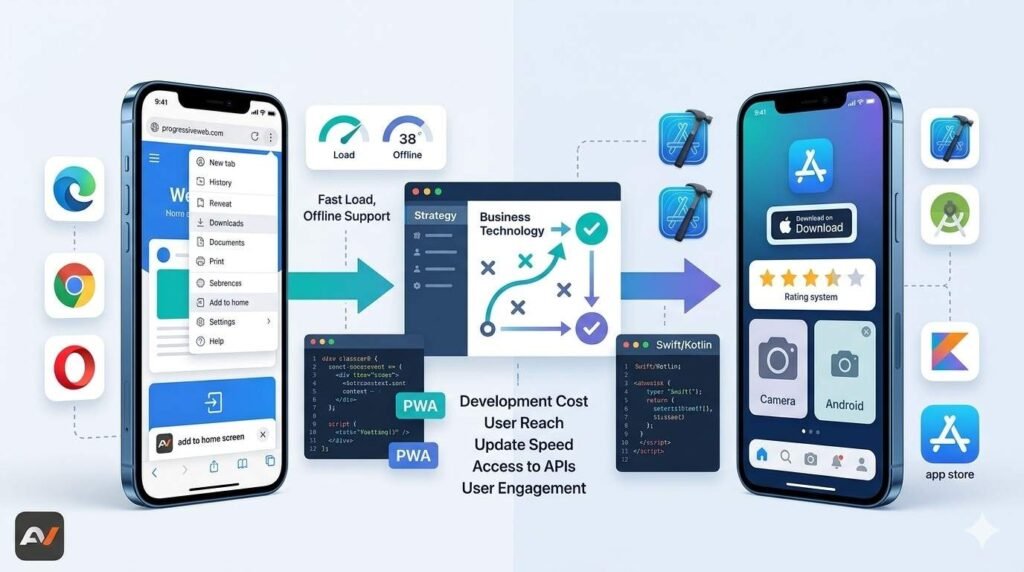
When businesses plan a new digital product, one of the first big decisions is whether to build a progressive web app or a native app. At first glance, both can deliver mobile-friendly experiences. However, the way they are built, distributed, maintained, and used can be very different. That is why the question of progressive web apps vs native app is not just technical. It affects cost, user experience, performance, launch speed, and long-term product strategy. MDN defines a progressive web app, or PWA, as an app built with web technologies that still provides an experience similar to a platform-specific app. Meanwhile, platform-specific apps are built for a specific operating system, such as iOS or Android, using the platform’s SDK. Because of that, there is no universal winner. The right option depends on what your business needs the product to do, how your users will access it, and what level of device integration or performance the experience requires. In some cases, a PWA is the smarter path because it is easier to deploy and maintain across platforms. In other cases, native apps make more sense because they offer deeper platform access and stronger performance for demanding use cases. So, before choosing one, it helps to understand how both approaches actually work in practice. What is a progressive web app? A progressive web app is essentially a web application that uses modern browser capabilities to behave more like an installed app. According to MDN, PWAs can run across multiple platforms and devices from a single codebase, while also offering features such as installation, offline support, background behavior, and integration with the device and other installed apps. Chrome Developers describes them similarly, noting that PWAs can evolve from regular browser pages into immersive, top-level apps. This matters because PWAs can reduce friction. Users can often access the product directly through a URL, and then install it if they want a more app-like experience. On iPhone, for example, Apple documents that websites can be added to the Home Screen and opened as web apps in Safari. On supported browsers and platforms, PWAs can also show up in launch surfaces and behave more like installed software. What is a native app? A native app is built specifically for an operating system such as iOS or Android. That means the app is developed using platform tools, design patterns, and APIs created for that specific environment. Android Developers emphasizes that Android apps can be built for many device types and use Android’s native development environment and platform resources. In addition, Android’s NDK exists to let developers use native code in performance-sensitive parts of an app when needed. As a result, native apps usually offer the deepest integration with device features and platform behavior. They are typically downloaded through app stores, can use operating system capabilities more directly, and are often the preferred choice for products that depend heavily on speed, graphics, hardware access, or advanced user interactions. So, while native development usually requires more platform-specific work, it can provide stronger control over the final experience. Progressive web apps vs native app: the core difference The main distinction in progressive web apps vs native app comes down to how each product is built and how it functions. A PWA is created with web technologies and designed to behave like an app, while a native app is developed specifically for a particular operating system. Because of that, PWAs often provide broader reach through a single codebase, whereas native apps usually offer deeper device integration and stronger platform-specific performance. MDN explains this clearly by describing PWAs as web-built experiences with app-like behavior, while platform-specific apps are tied directly to an operating system and its SDK. This difference shapes nearly every important business decision around product development. It influences how quickly the app can be launched, how many platforms need to be maintained, how much access the product has to device features, and how users discover and install the experience. As a result, the choice in progressive web apps vs native app is usually less about finding one universal winner and more about understanding which trade-offs make the most sense for your product. Where PWAs often make more sense PWAs are often a strong fit when reach, speed of deployment, and simpler maintenance matter more than the deepest native integration. Since a PWA can be built from web technologies and work across devices from one codebase, it can be a practical choice for businesses that want to move faster or reduce the overhead of maintaining separate iOS and Android apps. MDN explicitly points to the single-codebase advantage, and Chrome Developers highlights that PWAs can deliver app-like experiences while maintaining the web’s lower-friction model. That makes PWAs particularly useful for products such as customer portals, booking systems, commerce experiences, service dashboards, content-driven products, and digital tools where immediate accessibility matters. In these cases, being able to open the product in a browser, then optionally install it, may create less friction than forcing users to go through an app store first. Therefore, businesses focused on convenience, broad access, and web-first distribution often find PWAs appealing. If your team is evaluating web-first delivery, more focused pwa solutions can be useful when narrowing the right technical path. Where native apps often make more sense Native apps usually make more sense when the product depends on deeper device access, more advanced performance, or a highly polished platform-specific experience. For example, complex consumer apps, gaming products, camera-heavy experiences, performance-intensive tools, or products that need close interaction with operating system features often benefit from a native approach. Android Developers’ platform resources and NDK documentation reflect the strength of the native model for products that need direct access to platform capabilities or performance-sensitive code paths. Native apps can also make sense when app store presence is itself part of the business strategy. Some businesses want the discoverability, distribution model, and trust signals that app stores provide. In other cases, they need richer push behavior, deeper device integration, or